A WhatsApp team inbox so every customer gets an answer
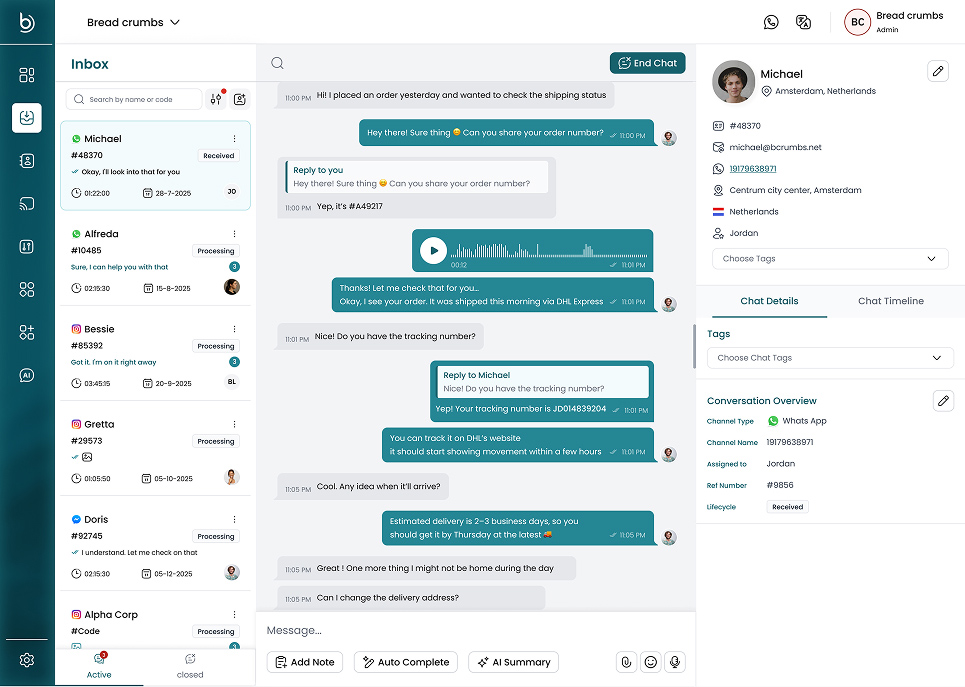
The Bread Crumbs WhatsApp team inbox lets your whole team answer your business number from one screen. Assign each chat, leave internal notes and see the customer history. Instagram, Facebook Messenger and Telegram chats land in the same inbox.
Everything you need to answer as a team
An owner for every chat
Assign a chat to a teammate or an AI assistant, or let Auto Assign share new chats out.
Internal notes
Write notes inside the chat for your team. The customer never sees them.
Customer and chat tags
Tag the customer for long-term segments, and tag the chat for the topic of this case.
Search and filters
Find a chat by customer name or phone number. Filter by assignee, including AI and unassigned chats.
Help while you type
The writing assistant polishes a reply, and one click summarizes a long chat.
Greetings and holiday replies
Send an automatic greeting from each agent, and an away message on your days off.
Chats and customer details side by side
The chat list, the conversation and the customer profile on one screen.
Set up your team inbox in three steps
1. Connect your number
Connect your WhatsApp Business number, and keep the app on your phone if you want. Add Instagram, Messenger or Telegram if you use them.
2. Invite your team
Add teammates and give each one a role, so agents work their own chats and managers see everything.
3. Assign and answer
New chats arrive in one list. Assign them, reply, and end each chat when the customer is helped.
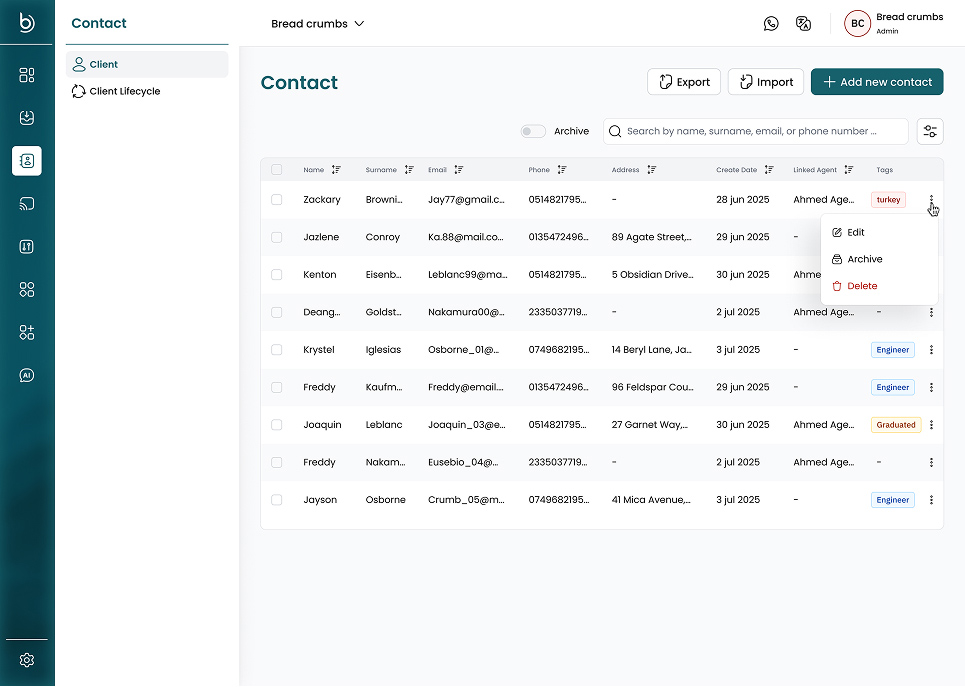
Every customer in one contact list
Each contact keeps their profile, tags and full chat history, so the next agent knows what happened before.
Built for teams that sell and support on WhatsApp
Sales teams
Answer leads from click-to-WhatsApp ads fast, and see which agent owns each lead.
Support teams
Share the workload, hand chats between shifts and keep the full history with each customer.
Growing small businesses
Move from one shared phone to an inbox the whole team can use at the same time.
Inbox questions
Questions about the WhatsApp team inbox
What is a WhatsApp team inbox?
It is one shared screen where several people answer the same business WhatsApp number. Each chat has an owner, so two people never reply to the same customer and no chat is forgotten.
Can I keep using the WhatsApp Business app on my phone?
Yes. When you connect WhatsApp, choose the option to connect your WhatsApp Business App. You keep the same number and the app, and your chats also appear in the team inbox.
Which channels can I connect?
WhatsApp (directly through Meta or through Gupshup), Instagram, Facebook Messenger and Telegram. You can also connect your own system as a custom channel through the API. All of them appear in the same inbox.
How are new chats assigned?
You can assign chats by hand, or turn on Auto Assign. It gives each new chat to the available agent with the fewest open chats. You can also route chats by the customer’s phone country code, to a person or to an AI assistant.
When does a conversation close?
An agent can end it, or it closes automatically after a time you choose in General Settings, from 8 hours to 1 week. WhatsApp allows free-form replies only within 24 hours of the customer’s last message. After that, you start again with an approved template.
How many people can use the inbox?
The Free plan includes 2 users, and paid plans include up to 9. Each person gets one of five roles: Owner, Admin, Manager, Agent+ or Agent.
Keep exploring
WhatsApp Broadcast
Send approved WhatsApp templates to the contacts you pick.
Crumby AI Agent
Let AI answer common questions from your own documents.
WhatsApp Analytics
Track response times, chat volume and ratings per agent.
Inbox guide
Learn how to filter, assign and tag conversations.
Pricing
Compare plans and monthly limits.
Give your team one WhatsApp inbox
Create a free workspace and connect your first channel.
