WhatsApp broadcast campaigns that reach the right contacts
Send a WhatsApp broadcast from one approved template to many contacts. Target them by lifecycle stage, tag and country, see the estimated Meta cost before you send, and track who received and read it. The Free plan includes 1,000 broadcast messages each month.
Create a campaign in four steps
1. Pick a template
Choose the WhatsApp number, an approved template and its language.
2. Fill and preview
Fill the template fields and preview the message before it goes out.
3. Choose recipients
Combine lifecycle stages, tags and countries, then check the audience and the estimated Meta cost.
4. Send or schedule
Launch now, or set a date and time. Bread Crumbs starts sending within minutes.
See what happened to every message
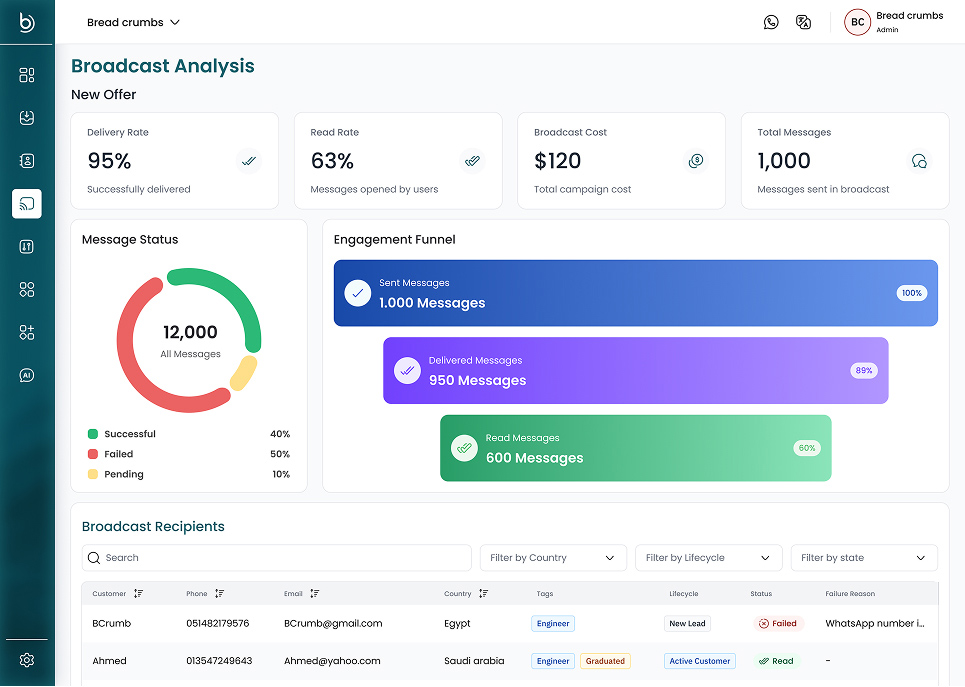
Delivery and read rates, campaign cost and the result for each recipient, with the reason when a message fails.
Measure and fix every campaign
Engagement funnel
Follow each campaign from sent to delivered to read.
Recipient results
Filter recipients by country, lifecycle stage and status, and see why a message failed.
Retry failed sends
Send again only to the recipients whose messages failed for a temporary reason.
Export the results
Download the delivery report as a CSV file for your own records.
Built for businesses that sell on WhatsApp
Shops and e-commerce
Tell recent customers about offers, new stock and seasonal sales.
Clinics and service businesses
Send reminders and follow-ups to one lifecycle stage, such as new patients.
Sales teams
Follow up with leads that went quiet, then answer their replies in the team inbox.
Broadcast questions
Questions about WhatsApp broadcasts
What is a WhatsApp broadcast?
A WhatsApp broadcast sends one approved message template to many contacts at once. You pick the recipients, fill the template fields and send now or at a set time.
Who can receive my broadcasts?
Contacts who messaged your business in the last 3 months. Numbers that never talked to your business cannot receive broadcasts.
How is this different from a broadcast list in the WhatsApp Business app?
A broadcast list in the app only reaches people who saved your number, and shows little about the results. Bread Crumbs sends through the official WhatsApp Business Platform, lets you schedule the send, and shows delivery, reads and failures for every recipient.
Do I need approved templates?
Yes. Create your templates in Meta WhatsApp Manager. After Meta approves a template, refresh your templates in Bread Crumbs and pick it.
What does a WhatsApp broadcast cost?
Two things. Each message sent successfully counts as one broadcast message on your plan, and failed sends don't count: the Free plan includes 1,000 a month, and paid plans up to 150,000. Meta also charges a fee per template message, which is not part of Bread Crumbs plans. Before you send, Bread Crumbs estimates the most Meta could charge for the campaign. To plan ahead, try the WhatsApp pricing calculator.
How do contacts opt out of broadcasts?
Add a quick-reply button with an opt-out word, such as NOT INTERESTED, to your template, and set the same word as the unsubscribe keyword in General Settings. When a contact sends exactly that word, Bread Crumbs archives the contact and stops sending them broadcasts.
Keep exploring
WhatsApp Team Inbox
Answer WhatsApp and your other channels from one shared inbox.
WhatsApp Analytics
Track response times, chat volume and ratings per agent.
WhatsApp API
Send and receive WhatsApp messages from your own code.
Broadcast guide
Create, target and schedule your first campaign.
WhatsApp pricing calculator
Estimate Meta fees by country and category, plus your plan.
Pricing
Compare plans and monthly limits.
Send your first WhatsApp broadcast
Create a free workspace and connect your WhatsApp number.
