Crumby, the WhatsApp AI agent that knows your business
Crumby is the Bread Crumbs WhatsApp AI agent. It answers the questions customers ask every day from your own files and Q&A, and hands the chat to your team when a person should take over.
Teach it, test it, turn it on
1. Add your knowledge
Upload files such as price lists, policies and FAQs, paste text, or add question-and-answer pairs.
2. Test it yourself
Ask Crumby what your customers ask, in the playground or from a test number, and fix the gaps.
3. Assign it to a channel
Crumby takes new chats on a WhatsApp number or another channel. Your team sees every chat in the inbox.
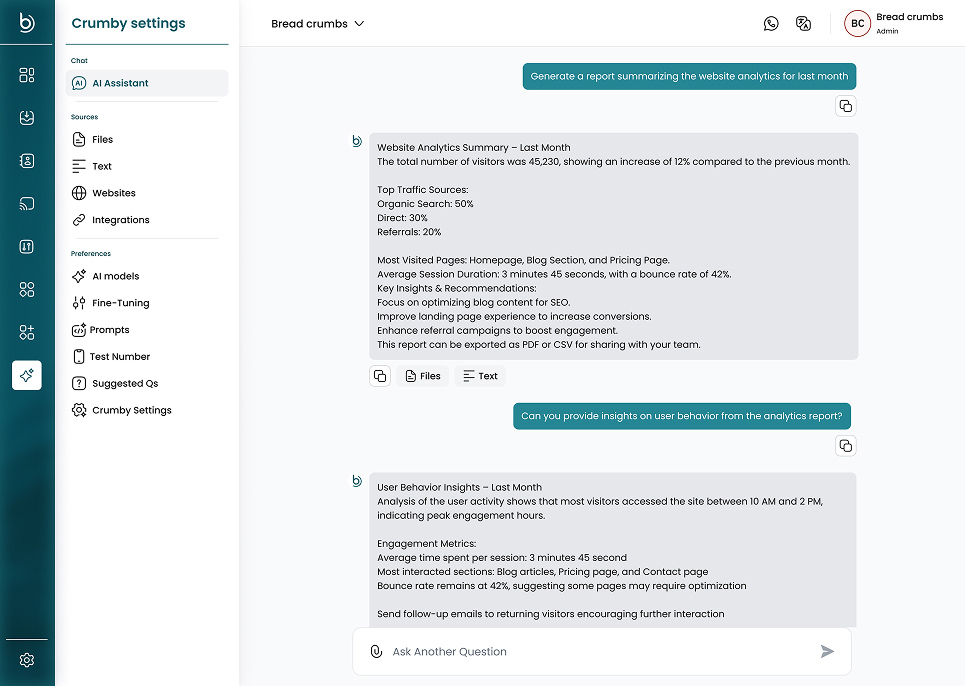
Crumby settings and the AI playground
Manage knowledge sources, AI models and prompts, and chat with Crumby to check its answers.
AI that follows your rules
Your prompts, your tone
Set Crumby’s role, persona, workflow and limits, so it answers the way your best agent would.
Hands over to people
Crumby passes the chat to a person when the customer asks or needs help it cannot give.
Rates and tags chats
On Crumby AI Plus plans, Crumby rates conversations and tags customers and chats by your rules.
Copilot for your team
On every plan, Workspace Copilot finds chats and contacts, drafts replies and runs reports when you ask.
Built for teams that get the same questions every day
Busy WhatsApp numbers
Answer price, hours and order questions at night and at weekends, and keep your team for the harder chats.
Ad-driven sales
Reply to every click-to-WhatsApp lead at once, then bring in a salesperson when the customer wants to buy.
Small support teams
Let Crumby take the first reply so a few people can handle many more chats.
AI questions
Questions about the Crumby AI agent
What does the Crumby WhatsApp AI agent do?
Crumby answers customer questions in live chats, using the files, text and Q&A you give it. It can ask for the customer’s name, email and address, tag the chat, close it when the customer is done, and hand it to a person.
When does Crumby hand a chat to my team?
Right away when the customer asks for a person or seems frustrated. When Crumby does not know the answer, or the customer wants to buy, get a quote or book, it offers to bring in a person. The chat goes to Auto Assign or to the agents you choose, and your team can take over any chat at any time.
Which plans include Crumby?
Every plan includes the writing assistant, Workspace Copilot and spam filtering. To let Crumby answer your customers, choose a Crumby AI Plus plan: Automate, Automate Plus or Automate Max. These also add conversation rating and auto-tagging.
Can I test Crumby before customers see it?
Yes. Ask it questions in the AI playground, or add a test number and message Crumby on WhatsApp yourself. Customers only reach Crumby after you assign it to a channel.
Which files can Crumby learn from?
PDF, TXT, Markdown, JSON and HTML files up to 20 MB each, plus text you paste in and question-and-answer pairs. You can save a good reply from the inbox as a new Q&A pair.
Can I use my own AI model?
Yes. Besides the built-in Bread Crumbs AI, you can connect OpenAI, Pinecone or your own endpoint as a custom AI.
Keep exploring
WhatsApp Team Inbox
Answer WhatsApp and your other channels from one shared inbox.
WhatsApp Analytics
Track response times, chat volume and ratings per agent.
WhatsApp API
Send and receive WhatsApp messages from your own code.
AI assistants guide
Create an AI assistant and assign it to a channel.
Pricing
Compare plans and monthly limits.
Put Crumby on your WhatsApp number
Choose a Crumby AI Plus plan, add your knowledge and test Crumby before customers see it.
