WhatsApp analytics that show how fast your team answers
Bread Crumbs WhatsApp analytics show your first response time, chat volume and customer ratings for every agent and channel. See where customers wait too long and which agent needs help.
One dashboard for your whole team
Total conversations, response time, delivery success and agent performance at a glance. Filter by date range, agent and channel.
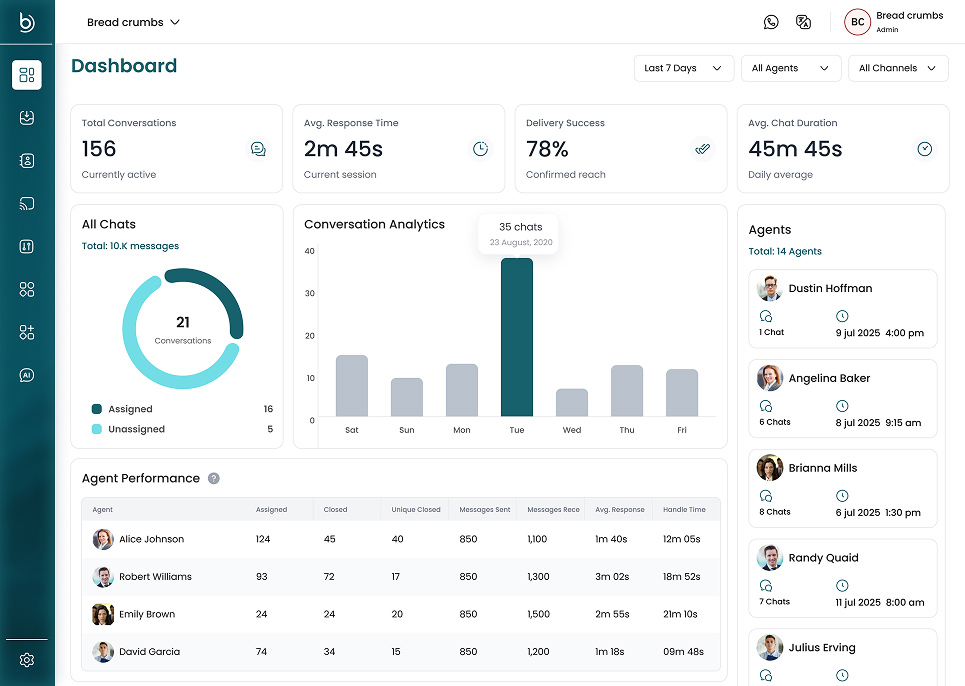
The numbers that matter for a messaging team
First response time
How long customers wait for the first reply, per channel and per agent.
Conversation volume
How many chats end each day and hour, and how many come from new customers.
Ratings and CSAT
How many customers rate the chat, the average rating from 1 to 5 and the share rated 4 or 5.
Message delivery
How many messages were sent, delivered, read or failed, hour by hour, plus a live count for today.
Tags and lifecycle stages
See which topics and which customer stages take the most chats and the longest replies.
Agent performance
Chats assigned and closed, messages sent, average response and handle time for each agent.
Reports you can break down
All reports use UTC days and hours.
| What it shows | Grouped by | |
|---|---|---|
| Conversations | Volume, response times and ratings | Channel, day and hour |
| Agents | The same metrics for each person | Agent, channel and day |
| Lifecycle stages | The same metrics for each stage | Stage, channel and day |
| Tags | The same metrics for each chat tag | Tag, channel and day |
| Messages | Message counts by delivery status | Hour |
Built for the people who run the inbox
Team leads
Spot slow replies and uneven workloads, and coach agents with real numbers.
Business owners
See whether your team keeps up with the chats your ads bring in.
Developers and analysts
Pull the same reports into your own BI tool through the report APIs.
Analytics questions
Questions about WhatsApp analytics
Which metrics does Bread Crumbs track?
Conversations, messages from your team and from customers, average first response time, average conversation time, new customers, how many customers left a rating, the average rating and CSAT.
How is first response time measured?
It is the time from the customer's first message to the first reply from your side, whether that reply comes from an agent, an AI assistant or an automated message. Bread Crumbs averages it across the conversations in your date range.
When does a conversation appear in reports?
When it ends: an agent or AI assistant ends it, or it closes automatically. Open conversations appear once they end.
Can I see how each agent performs?
Yes. The agent report shows the same metrics for each person on your team, by channel and by day. A conversation counts for the last person it was assigned to. Chats that only an AI assistant handled are left out.
Can I export the reports?
Yes. Download any dashboard card as a CSV file, or save the whole dashboard as a PDF.
Can I get the data through an API?
Yes. The report APIs return the same data as the dashboard. Owners, admins and managers can call them with a workspace API key.
Keep exploring
WhatsApp Team Inbox
Answer WhatsApp and your other channels from one shared inbox.
WhatsApp Broadcast
Send approved WhatsApp templates to the contacts you pick.
Crumby AI Agent
Let AI answer common questions from your own documents.
Report API reference
Pull conversation, agent and message reports into your tools.
Pricing
Compare plans and monthly limits.
See how fast your team answers
Create a free workspace and watch your numbers on the dashboard.
